
Introduction to UPenn Canvas Login

The University of Pennsylvania’s Canvas platform is a comprehensive learning management system designed to facilitate online learning, communication, and collaboration among students, instructors, and staff. For students and faculty to access various academic resources, assignments, and courses, logging into the UPenn Canvas is essential. This process, however, can sometimes be daunting for new users or those who encounter technical issues. Here are five tips to help you navigate the UPenn Canvas login process smoothly.
Understanding the UPenn Canvas Login Process

To log into the UPenn Canvas, you typically need your PennKey username and password. The PennKey is a unique identifier assigned to each member of the University of Pennsylvania community, including students, faculty, and staff. It’s crucial to remember that your PennKey and password are the same credentials used for other University services, emphasizing the importance of keeping this information secure.
5 Tips for a Smooth UPenn Canvas Login Experience

Here are some tips to ensure you can log into your UPenn Canvas account without any issues: - Ensure Your PennKey is Activated: Before attempting to log into Canvas, make sure your PennKey is activated. This is particularly important for new students or employees who may not have completed the activation process. - Use the Correct Login URL: Always use the official UPenn Canvas login page to avoid phishing scams. You can find this by searching for “UPenn Canvas” in your favorite search engine or by bookmarking the page for future use. - Keep Your Browser Updated: An outdated browser can sometimes cause issues with the Canvas platform. Ensure your browser is up-to-date, as Canvas supports the latest versions of Chrome, Firefox, Safari, and Edge. - Clear Your Browser Cache: If you’re experiencing issues logging in, try clearing your browser’s cache and cookies. This can resolve problems caused by outdated or corrupted data stored in your browser. - Contact Support if Necessary: If after trying the above steps you still cannot log in, don’t hesitate to reach out to the University of Pennsylvania’s Information Systems & Computing (ISC) support team. They can assist with PennKey issues, password resets, and other technical problems related to Canvas access.
Common Issues and Solutions
Sometimes, despite your best efforts, you might encounter common issues such as forgotten passwords or account lockouts. Here are a few solutions:
- Forgotten Password: You can reset your password using the PennKey password reset tool. This tool will guide you through the process of creating a new password.
- Account Lockout: If your account is locked due to multiple incorrect login attempts, contact the ISC support team to have your account unlocked.
- Technical Issues: For any technical issues with the Canvas platform itself, such as error messages or failure to load pages, check the Canvas status page for any known issues or scheduled maintenance.
📝 Note: Always keep your PennKey and password confidential to protect your personal and academic information.
Enhancing Your UPenn Canvas Experience

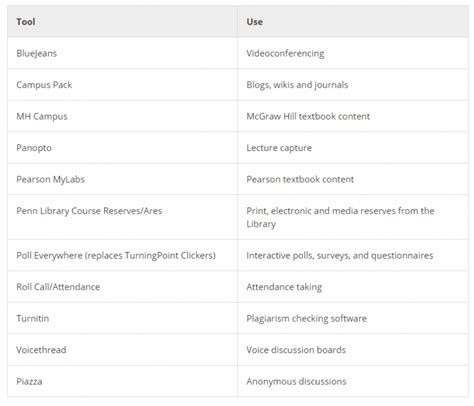
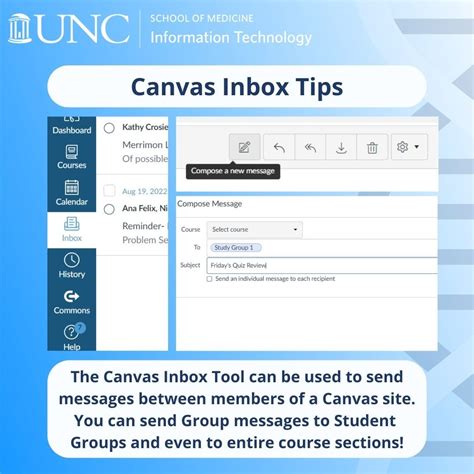
Beyond just logging in, understanding how to navigate and utilize the features of UPenn Canvas can significantly enhance your academic experience. The platform offers a wide range of tools and resources, including discussion boards, online assignment submissions, quizzes, and collaboration spaces. Taking some time to explore these features and how they can be used to support your learning can make a substantial difference in your engagement and success.
| Feature | Description |
|---|---|
| Modules | Organized content where instructors can structure and sequence course materials. |
| Discussions | A space for asynchronous class discussions and interactions. |
| Assignments | A tool for submitting work online, which can include files, text entries, or media recordings. |

In summary, accessing the UPenn Canvas requires a combination of having the right credentials, using the correct login methods, and sometimes troubleshooting common issues. By following the tips outlined above and staying informed about the resources available on the Canvas platform, you can ensure a smooth and productive academic experience at the University of Pennsylvania.
What is my PennKey, and how do I activate it?

+
Your PennKey is a unique identifier assigned to you by the University of Pennsylvania. To activate it, visit the PennKey activation page and follow the instructions provided. You will need your PennID number and other personal details to complete the activation process.
How do I reset my PennKey password?

+
To reset your PennKey password, go to the PennKey password reset tool. You will need to provide your PennKey or PennID and follow the prompts to create a new password. Ensure your new password meets the security requirements outlined on the page.
What should I do if I encounter technical issues with Canvas?

+
If you encounter technical issues with Canvas, first try clearing your browser cache and ensuring your browser is up-to-date. If the issue persists, contact the University of Pennsylvania’s Information Systems & Computing (ISC) support team for assistance. They can help resolve issues related to Canvas access and functionality.