
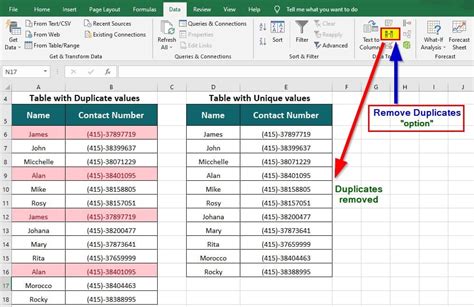
Introduction to Removing Duplicates

Removing duplicates from a dataset, list, or any collection of items is a crucial step in data cleaning and preprocessing. Duplicates can skew analysis results, inflate storage needs, and complicate data management. There are several methods to remove duplicates, each with its own advantages and suitable scenarios. This post will explore five key ways to remove duplicates, covering both manual and automated approaches.
Understanding Duplicates

Before diving into the methods of removing duplicates, it’s essential to understand what duplicates are. In the context of data, duplicates refer to identical or nearly identical entries. These could be rows in a database, items in a list, or records in a dataset. The definition of “identical” can vary depending on the context, sometimes considering partial matches as duplicates.
Method 1: Manual Removal
Manual removal of duplicates involves manually reviewing a dataset or list and removing any duplicate entries found. This method is straightforward but can be time-consuming and prone to errors, especially with large datasets. It’s most suitable for small datasets or when the duplicates are easily identifiable.
- Advantages: Simple to implement, no need for special tools.
- Disadvantages: Time-consuming, prone to human error.
Method 2: Using Spreadsheet Functions

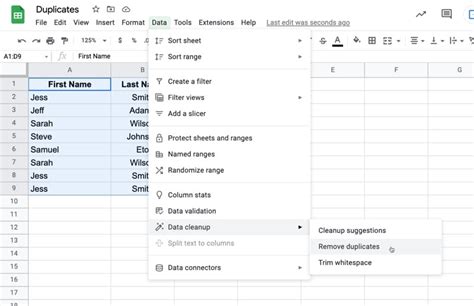
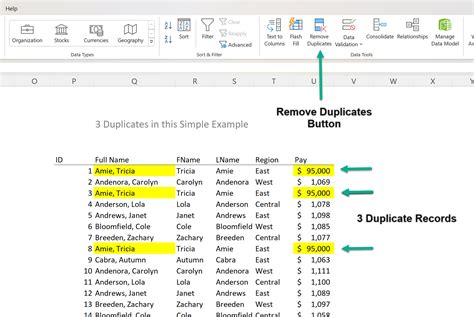
For those working with spreadsheets like Microsoft Excel or Google Sheets, there are built-in functions and features that can help remove duplicates. These tools can automatically identify and remove duplicate rows based on one or more columns.
| Tool | Method |
|---|---|
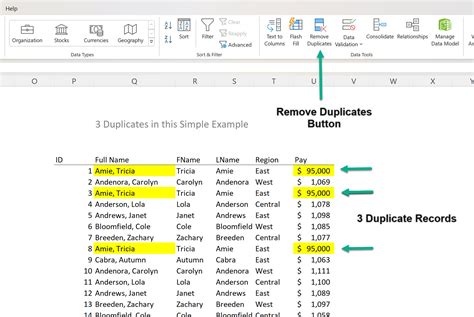
| Microsoft Excel | Use the "Remove Duplicates" feature under the Data tab. |
| Google Sheets | Use the "Remove duplicates" option under the Data menu. |
Method 3: Programming Languages

Programming languages such as Python, R, and SQL offer powerful libraries and commands to remove duplicates from datasets. For example, in Python, the pandas library provides a
drop_duplicates method for DataFrames.
import pandas as pd

# Create a DataFrame
data = {'Name': ['Tom', 'Nick', 'John', 'Tom'],
        'Age': [20, 21, 19, 20]}
df = pd.DataFrame(data)

# Remove duplicates
df = df.drop_duplicates()

print(df)
Method 4: Database Queries

In databases, SQL queries can be used to remove duplicates. This can be done using the
DISTINCT keyword to select unique rows or by using GROUP BY to group identical rows together and then select one representative from each group.
-- Using DISTINCT
SELECT DISTINCT column1, column2
FROM tablename;

-- Using GROUP BY
SELECT column1, MIN(column2)
FROM tablename
GROUP BY column1;
Method 5: Automated Tools and Software

There are numerous automated tools and software designed specifically for data cleaning and preprocessing, including duplicate removal. These tools can handle large datasets efficiently and often provide more advanced features for defining what constitutes a duplicate.
📝 Note: When choosing an automated tool, consider the size of your dataset, the complexity of your data, and the specific features you need.
Best Practices for Removing Duplicates

Regardless of the method chosen, there are best practices to keep in mind: - Backup Data: Always backup your data before removing duplicates to prevent loss of information. - Define Duplicates: Clearly define what constitutes a duplicate in your context. - Test Methods: Test your method on a small subset of data before applying it to the entire dataset.
In the end, the choice of method depends on the size and complexity of the dataset, the available tools and expertise, and the specific requirements of the project. By understanding and applying these methods effectively, individuals can ensure their data is clean, accurate, and ready for analysis or further processing.
To wrap things up, removing duplicates is an essential step in data preparation that can significantly impact the quality and reliability of data analysis and processing. By selecting the appropriate method and following best practices, users can efficiently manage duplicates and ensure their data is in the best possible state for its intended use.
What are duplicates in data?
+
Duplicates in data refer to identical or nearly identical entries within a dataset or list.
Why is it important to remove duplicates?

+
Removing duplicates is crucial for data cleaning and preprocessing as it prevents skewed analysis results, reduces storage needs, and simplifies data management.
What methods can be used to remove duplicates?
+
Methods include manual removal, using spreadsheet functions, programming languages, database queries, and automated tools and software.