
Introduction to Penn Email Login
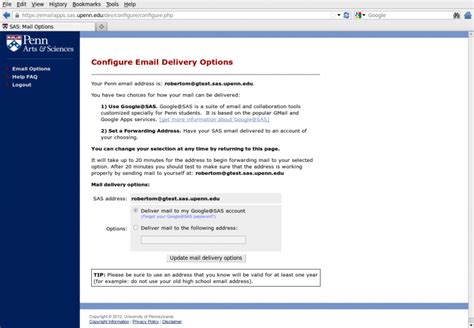
The University of Pennsylvania provides its students, faculty, and staff with a reliable and secure email service. This email system is an essential tool for communication within the university community. To access the Penn email system, users must first log in through the university’s portal. This guide will walk you through the steps to successfully log in to your Penn email account.
Prerequisites for Penn Email Login

Before attempting to log in, ensure you have the following:
- A valid PennKey username and password. If you haven’t already, you will need to claim your PennKey through the university’s website.
- A device with internet access. This can be a computer, tablet, or smartphone.
- A supported web browser. The university recommends using the latest versions of Chrome, Firefox, Safari, or Edge for the best experience.
Step-by-Step Guide to Penn Email Login

To log in to your Penn email account, follow these steps:
- Navigate to the University of Pennsylvania’s website and click on the “Penn Portal” or directly go to portal.apps.upenn.edu.
- Click on the “Log in” button and enter your PennKey username and PennKey password.
- Once logged in, you will be redirected to the Penn Portal dashboard. From here, you can access various university services, including your email.
- To access your email, click on the “Email” link. This will take you to the Penn email login page.
- Enter your PennKey username and PennKey password again if prompted, and you will be logged in to your email account.
Troubleshooting Common Issues

If you encounter any issues during the login process, consider the following troubleshooting steps:
- Forgot PennKey Password: If you have forgotten your PennKey password, you can reset it through the PennKey website.
- Account Lockout: If your account is locked due to multiple incorrect login attempts, contact the University of Pennsylvania’s Information Security and Privacy office for assistance.
- Browser Issues: Try clearing your browser’s cache and cookies or switching to a different browser if you’re experiencing technical difficulties.
🚨 Note: Always ensure your device and browser are updated with the latest security patches to protect your account from unauthorized access.
Securing Your Penn Email Account

To keep your Penn email account secure:
- Use a strong and unique password for your PennKey.
- Enable two-factor authentication (2FA) whenever possible to add an extra layer of security.
- Be cautious of phishing attempts. Never provide your login credentials in response to unsolicited emails or messages.
Conclusion and Final Thoughts

Logging in to your Penn email account is a straightforward process once you have your PennKey credentials. By following the steps outlined in this guide and taking the necessary precautions to secure your account, you can ensure a safe and productive email experience. Remember, your Penn email is a critical tool for communication and information sharing within the university community, so it’s essential to familiarize yourself with its features and best practices.
What is my PennKey?

+
Your PennKey is your username and password combination that grants access to University of Pennsylvania’s online resources, including your email.
How do I reset my PennKey password?

+
You can reset your PennKey password through the PennKey website. Follow the prompts to enter your username and then create a new password.
Is two-factor authentication required for Penn email login?

+
While not always required, enabling two-factor authentication (2FA) is highly recommended to add an extra layer of security to your account.