Introduction to CAGR Calculation in Excel

Calculating the Compound Annual Growth Rate (CAGR) is a crucial step in understanding the growth of investments, sales, or any other financial metric over time. CAGR provides a clear picture of the average rate of return of an investment over a specified period, making it easier to compare different investment opportunities. Microsoft Excel, with its robust set of financial functions, makes calculating CAGR straightforward. This article will explore five ways to calculate CAGR in Excel, highlighting the different formulas and scenarios where each might be applied.
Understanding CAGR

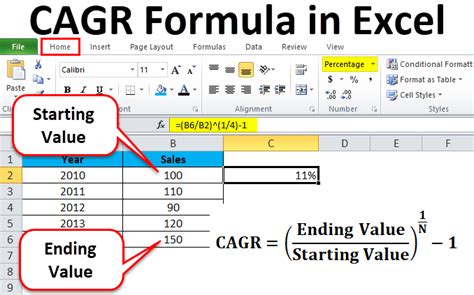
Before diving into the calculation methods, it’s essential to understand what CAGR represents. The Compound Annual Growth Rate is the rate of return of an investment over a specified period longer than one year. It represents the idea that the investment generates returns on its returns, leading to exponential growth. The formula for CAGR is: [ \text{CAGR} = \left( \frac{\text{End Value}}{\text{Beginning Value}} \right)^{\frac{1}{\text{Number of Years}}} - 1 ] This formula will be the basis for our calculations in Excel.
Method 1: Using the CAGR Formula Directly
The most straightforward way to calculate CAGR in Excel is by directly applying the CAGR formula. Assume you have the beginning value of an investment in cell A1 and the end value in cell B1, with the number of years in cell C1.
- Beginning Value: Cell A1 = $100
- End Value: Cell B1 = $150
- Number of Years: Cell C1 = 3
The CAGR formula in Excel would be:
=(B1/A1)^(1/C1)-1
This method is simple and effective for calculating CAGR when you have the beginning and end values, along with the duration of the investment.
Method 2: Using the POWER Function
Excel’s POWER function can also be used to calculate CAGR. The POWER function raises a number to a power. The syntax for the POWER function is
POWER(number, power). To calculate CAGR using the POWER function, you would use the formula:
=POWER(B1/A1,1/C1)-1
This formula is equivalent to the direct CAGR formula, offering an alternative way to express the calculation.
Method 3: Using the RATE Function for Multiple Periods

For investments with multiple periodic payments or withdrawals, calculating CAGR can be more complex. Excel’s RATE function can be useful in such scenarios. The RATE function calculates the interest rate per period of an investment. However, to use it for CAGR calculation, you need to know the number of periods and the payments or withdrawals made during the investment period.
Assuming an initial investment of 100, growing to 150 over 3 years with annual compounding: - The formula might look something like this, but note that the RATE function typically requires known periodic payments, which might not directly apply to a simple CAGR calculation without additional periodic cash flows.
=RATE(C1,,A1,-B1)
However, for simple CAGR calculations without periodic cash flows, this method is less commonly used.
Method 4: Using Logarithms

Another approach to calculating CAGR involves using logarithms. The natural logarithm (LN) function in Excel can be used to linearize the exponential growth, making it easier to calculate the CAGR. The formula using natural logarithms is:
=EXP(LN(B1/A1)/C1)-1
This method is particularly useful for understanding the underlying mathematics of exponential growth and can be a powerful tool in more complex financial modeling.
Method 5: Using the XIRR Function for Irregular Periods

For investments with irregular periods or cash flows at different times, the XIRR (Extended Internal Rate of Return) function can be more appropriate. XIRR calculates the internal rate of return for a series of cash flows that occur at irregular intervals. While not a direct CAGR calculation, XIRR can provide a rate of return that accounts for the timing and amount of cash flows, which can be useful in certain investment analysis scenarios.
=XIRR(values, dates)
Here, “values” would be a series of cash flows (including the initial investment as a negative value and the final value as a positive value), and “dates” would be the corresponding dates of these cash flows.
📝 Note: The choice of method depends on the specific details of your investment, such as whether you have regular or irregular cash flows, and whether you're looking at the growth of a single investment or comparing multiple investments.
Comparison and Choosing the Right Method
Each of the methods outlined has its use cases, depending on the specifics of what you’re trying to calculate. For simple, straightforward CAGR calculations where you know the beginning and end values and the number of years, the direct CAGR formula or the POWER function will suffice. For more complex scenarios involving irregular periods or multiple cash flows, the RATE, logarithmic, or XIRR functions might be more appropriate.
| Method | Formula/Function | Use Case |
|---|---|---|
| Direct Formula | =(B1/A1)^(1/C1)-1 | Simple CAGR calculations |
| POWER Function | =POWER(B1/A1,1/C1)-1 | Alternative to direct formula |
| RATE Function | =RATE(C1,,A1,-B1) | Multiple periodic payments or withdrawals |
| Logarithmic Method | =EXP(LN(B1/A1)/C1)-1 | Understanding exponential growth |
| XIRR Function | =XIRR(values, dates) | Irregular periods or cash flows |
In conclusion, calculating CAGR in Excel can be accomplished in several ways, each with its own set of scenarios where it is most applicable. Understanding the different methods and when to use them can significantly enhance your ability to analyze investments and make informed financial decisions. Whether you’re dealing with simple growth over a few years or complex investments with irregular cash flows, Excel provides the tools you need to calculate and understand the compound annual growth rate of your investments.
What is CAGR, and why is it important?

+
CAGR stands for Compound Annual Growth Rate. It’s a measure of the average rate of return of an investment over a specified period longer than one year. CAGR is important because it gives investors a clear picture of how their investments are performing over time, making it easier to compare different investment opportunities.
How do I choose the right method for calculating CAGR in Excel?
+
The choice of method depends on the specifics of your investment. For simple scenarios, the direct CAGR formula or POWER function will work. For more complex investments with irregular periods or multiple cash flows, consider using the RATE, logarithmic method, or XIRR function.
Can I use CAGR to compare different investment types?

+
Yes, CAGR is a useful metric for comparing the performance of different investments. By calculating the CAGR for each investment, you can directly compare their average annual returns over the same period, helping you make more informed investment decisions.